
Introduction
In today’s fast-growing eCommerce world, automation and seamless payment processing are essential for running a successful online business. One of the most powerful combinations for sellers is ShipStation PayPal integration, which allows merchants to connect their shipping management system with a globally trusted payment gateway.
Whether you are a small Shopify seller, a growing Amazon business owner, or managing a multi-channel eCommerce store, combining ShipStation with PayPal can save time, reduce errors, and improve customer satisfaction.
This guide explains everything about ShipStation PayPal setup, benefits, features, troubleshooting, and optimization strategies for better order fulfillment and business scaling.
What is ShipStation PayPal Integration?
The ShipStation PayPal integration is a connection between the shipping automation platform ShipStation and the payment processing system PayPal.
- ShipStation helps businesses manage, process, and ship orders from multiple sales channels.
- PayPal handles secure online payments and transaction processing.
When both systems are integrated, order details from PayPal automatically flow into ShipStation, allowing merchants to print labels, track shipments, and manage logistics without manual entry.
This integration is especially useful for:
- Online retailers
- Dropshipping businesses
- Marketplace sellers
- Subscription box companies
Why Use ShipStation with PayPal?
Using ShipStation PayPal together provides a streamlined workflow that reduces manual workload and improves efficiency.
1. Automated Order Import
Orders paid through PayPal are automatically imported into ShipStation. This eliminates the need for manual order entry.
2. Faster Shipping Process
You can quickly generate shipping labels, track orders, and notify customers.
3. Centralized Order Management
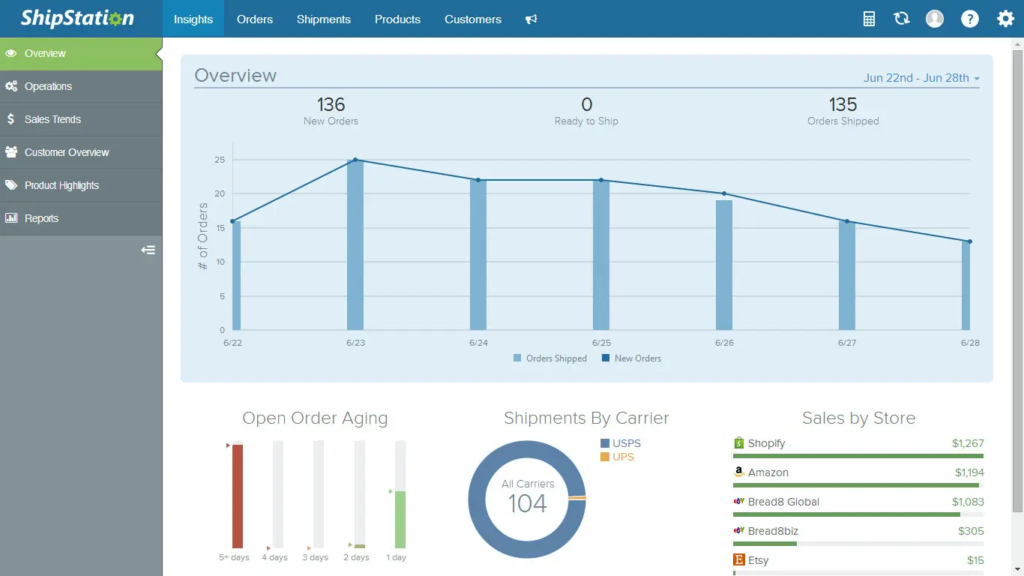
All PayPal transactions are visible in one dashboard inside ShipStation.
4. Reduced Human Errors
Automation reduces mistakes in shipping addresses and order details.
5. Better Customer Experience
Customers receive faster delivery updates and tracking notifications.
How ShipStation PayPal Integration Works
The integration works through API-based data syncing between both platforms.
Step-by-Step Process:
- Customer places an order and pays via PayPal.
- PayPal records the transaction.
- ShipStation automatically imports order details.
- Merchant processes shipping inside ShipStation.
- Tracking number is sent back to PayPal and customer.
- Customer receives shipping updates.
This seamless flow improves operational efficiency for eCommerce businesses of all sizes.
Setting Up ShipStation PayPal Integration
Setting up the integration is simple if you follow the correct steps.
Step 1: Log in to ShipStation
Go to your ShipStation dashboard and navigate to the “Integrations” section.
Step 2: Add PayPal Account
Click on “Connect a Store or Marketplace” and select PayPal.
Step 3: Authorize Connection
Log in to your PayPal account and grant permissions to ShipStation.
Step 4: Configure Import Settings
Choose settings like:
- Order status to import
- Time range for syncing orders
- Payment filters
Step 5: Test the Connection
Place a test order to ensure synchronization works properly.
Features of ShipStation PayPal Integration
1. Real-Time Order Sync
Orders from PayPal appear instantly in ShipStation.
2. Multi-Carrier Shipping
ShipStation supports USPS, DHL, FedEx, UPS, and more.
3. Discounted Shipping Rates
Users can access lower shipping rates through integrated carriers.
4. Automated Tracking Updates
Tracking numbers are sent automatically to PayPal and customers.
5. Custom Branding
You can customize shipping labels and notifications.
Benefits of ShipStation PayPal Integration for eCommerce
Improved Efficiency
Automation reduces manual work and saves time.
Scalability
Businesses can handle thousands of orders without hiring extra staff.
Cost Savings
Lower shipping rates and fewer manual errors reduce operational costs.
Better Inventory Management
ShipStation helps track stock levels more effectively.
Enhanced Reporting
You get detailed reports on shipping performance and order trends.
Common Issues in ShipStation PayPal Integration
Even though the system is reliable, some users may face issues.
1. Delayed Order Sync
Sometimes orders take time to appear in ShipStation.
Solution: Refresh API connection or reauthorize PayPal.
2. Missing Orders
Orders may not import if filters are misconfigured.
Solution: Check import settings and time range.
3. Payment Status Errors
Only “Completed” PayPal payments are imported.
Solution: Ensure payments are finalized.
4. Tracking Not Updated
Tracking numbers may not sync back to PayPal.
Solution: Enable automatic tracking updates in ShipStation settings.
Best Practices for ShipStation PayPal Integration
To maximize performance, follow these best practices:
1. Regularly Sync Accounts
Keep PayPal and ShipStation connections updated.
2. Use Automation Rules
Set rules for shipping methods based on order weight or destination.
3. Optimize Packaging
Use predefined package settings to speed up label creation.
4. Monitor Shipping Performance
Analyze delivery times and carrier performance.
5. Enable Notifications
Always keep customers informed with tracking updates.
ShipStation PayPal for Small Businesses
Small businesses benefit the most from this integration because it eliminates complex logistics management.
- No need for manual order entry
- Reduced shipping workload
- Faster order fulfillment
- Professional customer experience
Even solo entrepreneurs can manage high order volumes efficiently.
ShipStation PayPal for Large Enterprises
For large businesses, this integration supports scalability and automation.
- Multi-user access
- Advanced reporting tools
- Bulk label printing
- Warehouse management integration
It allows enterprises to handle thousands of orders daily without operational delays.
If you are running an eCommerce blog or website, targeting keywords like ShipStation PayPal integration can help attract high-intent traffic.
- High commercial intent keyword
- Low competition long-tail variations
- Strong eCommerce niche relevance
- Better conversion rate potential
To rank higher, use related keywords like:
- PayPal shipping automation
- ShipStation setup guide
- eCommerce shipping software
- PayPal order management
Future of ShipStation PayPal Integration
With increasing automation in eCommerce, the integration between shipping and payment platforms will become even more advanced.
Future improvements may include:
- AI-based shipping optimization
- Real-time fraud detection
- Smarter logistics routing
- Deeper marketplace integration
Businesses adopting this integration early will gain a competitive advantage.
Conclusion
The ShipStation PayPal integration is a powerful solution for modern eCommerce businesses looking to automate shipping and payment workflows. It simplifies order management, reduces manual errors, and enhances customer satisfaction.
Whether you are a beginner seller or an established online brand, combining ShipStation with PayPal can significantly improve your operational efficiency and scalability.
By implementing the best practices and optimizing your workflow, you can take full advantage of this integration and grow your online business effectively.
