
In today’s digital world, collecting information online has become essential for businesses, freelancers, schools, and organizations. Whether you need a contact form, event registration form, payment form, or survey, having a reliable online form builder saves time and improves productivity. One of the most trusted tools in this space is Cognito Forms.
Cognito Forms is a powerful online form builder that allows users to create professional, secure, and customizable forms without needing coding skills. It is known for its advanced automation features, calculations, payment integrations, and workflow tools.
In this detailed guide, we will explore everything you need to know about Cognito Forms, including its features, benefits, pricing, use cases, and why it is becoming a popular choice for businesses worldwide.
What Is Cognito Forms?
Cognito Forms is an online form-building platform that helps users create custom forms for collecting data, processing payments, managing workflows, and automating tasks. It is designed for both beginners and professionals, offering an easy drag-and-drop interface along with advanced functionality like conditional logic, calculations, and integration support.
Unlike basic form builders, Cognito Forms focuses on flexibility and automation. This makes it an excellent choice for businesses that want more than just simple contact forms.
Why Cognito Forms Is Popular in 2026
The demand for automation and digital data collection is increasing every year. In 2026, businesses want tools that reduce manual work and improve customer experience. That’s where Cognito Forms stands out.
Here are some key reasons why Cognito Forms is popular:
- Easy form creation with drag-and-drop tools
- Powerful conditional logic and calculations
- Secure data storage and privacy controls
- Payment integrations for online transactions
- Workflow automation for teams and organizations
- Mobile-friendly and responsive form design
Cognito Forms is widely used by small businesses, corporate teams, educational institutions, and even healthcare organizations.
Key Features of Cognito Forms
One of the biggest reasons why Cognito Forms is considered a top form builder is its feature-rich platform. Let’s explore the most important features.
Drag-and-Drop Form Builder in Cognito Forms
The Cognito Forms form builder is user-friendly and does not require coding. Users can easily add fields like:
- Text boxes
- Dropdown menus
- Checkboxes
- File upload fields
- Date and time pickers
- Signature fields
The drag-and-drop system makes it easy to create forms in minutes.
Conditional Logic in Cognito Forms
Conditional logic is one of the most powerful features of Cognito Forms. It allows you to show or hide fields based on user responses.
For example:
- If someone selects “Business Inquiry,” then business-related fields appear.
- If a user selects “Yes,” then additional questions are displayed.
This makes forms shorter, more professional, and easier for users to complete.
Calculations and Math Fields in Cognito Forms
Unlike many form builders, Cognito Forms supports advanced calculations. This feature is useful for:
- Invoices
- Quotation forms
- Tax calculation forms
- Price estimators
- Loan calculators
You can create dynamic forms where the total price updates automatically based on user selections.
File Upload Option in Cognito Forms
With Cognito Forms, users can upload files directly inside forms. This is extremely helpful for:
- Job applications
- Insurance claims
- Document submission
- Admission forms
- Legal and contract workflows
You can also limit file size and file type for better security.
Payment Integration in Cognito Forms
Online payments are a major part of modern business. Cognito Forms supports payment collection through popular payment processors.
Common use cases include:
- Event ticket payments
- Subscription forms
- Product order forms
- Donation forms
- Service booking payments
This feature makes Cognito Forms a strong competitor to platforms like Jotform, Typeform, and Google Forms.
Cognito Forms Templates and Customization
A major advantage of Cognito Forms is the availability of ready-to-use templates. Templates allow users to quickly launch forms without starting from scratch.
Common Cognito Forms Templates
- Contact forms
- Registration forms
- Customer feedback forms
- Payment and invoice forms
- Medical intake forms
- HR onboarding forms
- Booking and appointment forms
These templates can be customized according to your brand requirements.
Branding Options in Cognito Forms
Cognito Forms allows you to customize your forms with:
- Logo upload
- Theme colors
- Custom fonts
- Field layouts
- Custom CSS (for advanced users)
This helps you create professional forms that match your business identity.
Cognito Forms Integrations and Automation
Businesses today rely on automation tools to save time. Cognito Forms provides integration features that allow users to connect their forms with other apps.
Popular Cognito Forms Integrations
Cognito Forms can integrate with tools such as:
- Zapier
- Microsoft Power Automate
- Google Sheets
- Microsoft Excel
- CRM platforms
- Email marketing tools
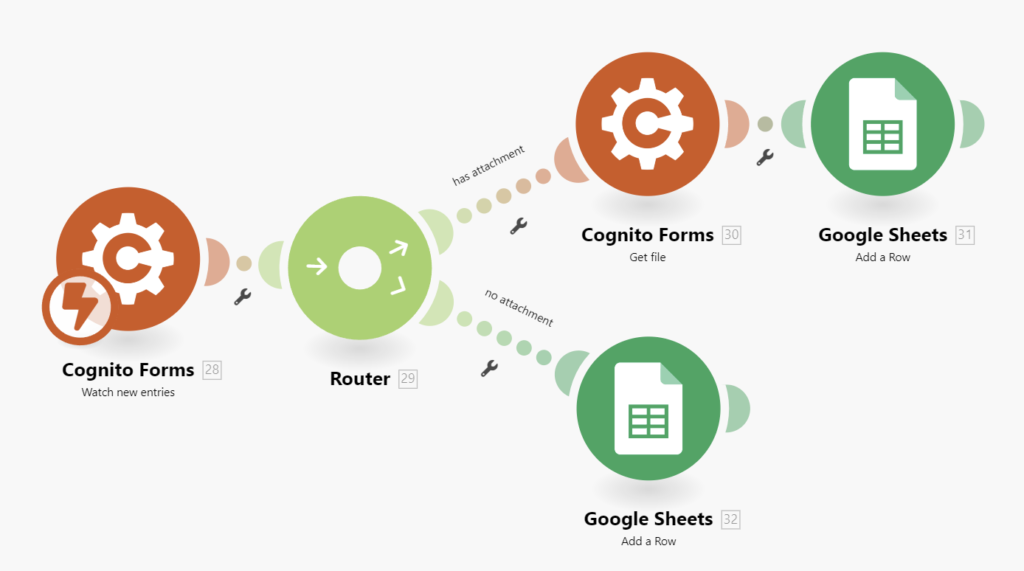
This means every time a user submits a form, the data can automatically be stored, emailed, or transferred to another system.
Email Notifications in Cognito Forms
With Cognito Forms, you can set up automatic email notifications for both the user and your team.
For example:
- A customer gets a confirmation email after form submission
- Your sales team gets notified about new leads
- HR receives job application details instantly
This improves communication and reduces manual follow-up work.
Cognito Forms Security and Data Privacy
Security is one of the most important factors when choosing a form builder. Cognito Forms provides multiple security features to protect user data.
Security Features in Cognito Forms
- SSL encryption for secure form submissions
- Password-protected forms
- Access control and role management
- Data encryption options
- Secure cloud storage
- Audit tracking for form activity
These features make Cognito Forms suitable for sensitive industries like healthcare and finance.
GDPR and Compliance Support in Cognito Forms
In 2026, privacy laws like GDPR and other data protection regulations are critical. Cognito Forms supports compliance-friendly features like:
- Data control and export
- User access management
- Secure handling of personal data
- Consent checkbox fields
This is helpful for companies operating internationally.
Cognito Forms Pricing Plans
Pricing is one of the most important aspects when choosing a form tool. Cognito Forms provides flexible pricing based on user needs.
Cognito Forms Free Plan
Cognito Forms offers a free plan that is suitable for individuals and small projects. It includes basic form creation features and limited entries.
Best for:
- Students
- Small businesses
- Freelancers
- Testing and trial usage
Cognito Forms Paid Plans
Paid plans provide more advanced features such as:
- Higher form entry limits
- Payment processing
- Workflow automation
- Advanced security controls
- Integration support
- Team collaboration
Pricing usually depends on the number of users and the features included.
If you are running a business, paid plans are worth it because they unlock professional tools that improve efficiency.
Cognito Forms Use Cases for Businesses
Cognito Forms is not just for basic contact forms. It is widely used across different industries.
Cognito Forms for Small Businesses
Small businesses use Cognito Forms for:
- Customer inquiries
- Service bookings
- Order forms
- Feedback collection
- Payment forms
It helps them manage leads and automate workflows.
Cognito Forms for HR and Recruitment
HR departments can use Cognito Forms to create:
- Job application forms
- Employee onboarding forms
- Leave request forms
- Performance review forms
The automation features make HR processes faster and more organized.
Cognito Forms for Schools and Universities
Educational institutions often use Cognito Forms for:
- Admission forms
- Student registration forms
- Fee payment forms
- Parent consent forms
- Scholarship applications
It reduces paperwork and improves data management.
Cognito Forms for Healthcare and Clinics
Healthcare organizations need secure forms for collecting sensitive patient data. Cognito Forms can be used for:
- Patient intake forms
- Appointment booking forms
- Medical history forms
- Consent forms
Its privacy and security features make it suitable for medical use.
Cognito Forms vs Other Form Builders
There are many form builders available, but Cognito Forms stands out because of its advanced automation and pricing value.
Cognito Forms vs Google Forms
Google Forms is free and simple, but it lacks:
- Payment integration
- Advanced calculations
- Complex workflows
- Professional design flexibility
Cognito Forms is a better choice for business-level needs.
Cognito Forms vs Typeform
Typeform is known for its stylish and interactive form design. However:
- Typeform is more expensive
- Calculations and workflows are limited
- Advanced features require higher plans
Cognito Forms is more affordable and offers more powerful business features.
Cognito Forms vs Jotform
Jotform is a strong competitor, but Cognito Forms offers:
- Better calculation features
- Strong workflow automation
- More user-friendly advanced settings
Both are excellent, but Cognito Forms is often preferred for structured business workflows.
Advantages of Using Cognito Forms
Here are the biggest benefits of using Cognito Forms:
Easy to Use Platform
Even beginners can create professional forms quickly. The interface is simple, clean, and easy to understand.
Professional Automation Features
Cognito Forms supports workflows, calculations, and conditional logic, which makes it a great tool for businesses.
Affordable Pricing
Compared to many competitors, Cognito Forms provides excellent features at competitive pricing.
Customization and Branding
You can design forms that match your brand identity, which builds trust with customers.
Payment Collection Support
Businesses can accept payments directly through forms, making it easier to sell services and products online.
Disadvantages of Cognito Forms
While Cognito Forms is excellent, it also has a few limitations.
Limited Design Options Compared to Typeform
Cognito Forms focuses more on function than fancy form design. If you want extremely modern interactive forms, Typeform may look better.
Advanced Features Require Paid Plan
Some premium features like advanced automation and payment tools require a paid subscription.
However, for most businesses, these paid features are worth the cost.
How to Create a Form Using Cognito Forms
Creating a form in Cognito Forms is simple.
Step-by-Step Guide to Using Cognito Forms
- Create an account on Cognito Forms
- Choose a template or start from scratch
- Add fields using drag-and-drop tools
- Set conditional logic if needed
- Add calculations or pricing rules
- Customize design and branding
- Enable email notifications
- Connect payment integration if needed
- Publish and share the form link
- Track submissions from the dashboard
This workflow makes Cognito Forms beginner-friendly.
Best Tips for Optimizing Cognito Forms
If you want better results and more form submissions, follow these expert tips:
- Keep the form short and easy
- Use conditional logic to hide unnecessary fields
- Add progress indicators for long forms
- Use mobile-friendly layouts
- Enable auto-confirmation emails
- Test the form before publishing
- Use payment options for smooth checkout
- Add CAPTCHA to reduce spam
These tips will improve user experience and increase submission rates.
Is Cognito Forms Worth It in 2026?
Yes, Cognito Forms is definitely worth it in 2026, especially for businesses and organizations that need more than basic data collection.
It offers a powerful mix of:
- Form automation
- Secure data collection
- Payment processing
- Workflow management
- Integrations with other tools
If you want a professional form builder that can support business growth, Cognito Forms is one of the best choices.
Conclusion: Why Cognito Forms Is a Smart Choice
In today’s competitive digital world, businesses need smart tools that save time and improve productivity. Cognito Forms is a reliable, feature-rich, and affordable form-building platform that allows users to create powerful forms with automation, calculations, payment options, and secure data handling.
Whether you are a small business owner, HR manager, teacher, or healthcare provider, Cognito Forms can simplify your workflow and help you manage information professionally.
If you want an online form builder that is easy to use and provides advanced business tools, then Cognito Forms is an excellent solution.
